

 Lindsay Davis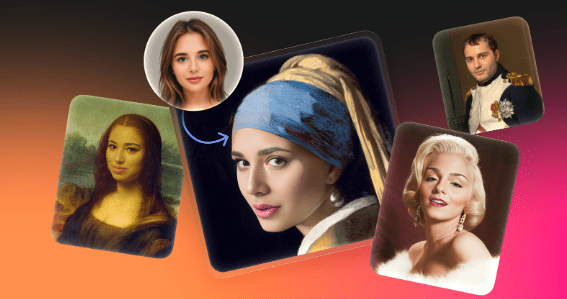
Retouching a face used to be a nightmare. Matching grain, color grading, lighting direction, and perspective required hours of patience. Even with advanced Photoshop masking, the result often looked like a collage-technically correct but biologically wrong.
AI-driven face swapping changed the game. It shifted the workload from manual compositing to curation. The tool provided by Icons8 bridges the gap between meme-generating mobile apps and professional editing software. It prioritizes high-resolution output and realistic blending over video animation.
Creative professionals now face a new question. It’s not “is it possible?” The real challenge is: How do we use Face Swapper responsibly in real workflows without crossing ethical or quality lines?
The Mechanics of the Morph
Sticker apps simply paste one image over another. Face Swapper works differently. It generates a new face mathematically, finding the middle ground between source and target. The AI analyzes facial landmarks, constructing a fresh image that resembles the source identity while locking in the target’s expression and lighting.
Synthesis is the key here. It’s not a copy-paste job.
Output resolutions hit 1024×1024 pixels for the face area. That beats many competitors capped at low resolutions meant for phone screens. Standard formats like JPG, PNG, and WEBP work seamlessly, provided the file size stays under 5 MB.
Scenario: Localizing Marketing Assets
Global marketing has a representation problem. A mid-sized agency might license a high-quality stock photo of a team meeting. Great lighting, high energy, but the models look predominantly European. Run that image in a Southeast Asian campaign, and it feels disconnected.
Reshoots burn budget. Manual compositing burns time.
Designers can fix this with Face Swapper. Upload the licensed “base” photo. Select source faces-either from a library of diverse model headshots or AI-generated faces that don’t belong to real people. The tool detects faces in the group shot instantly.
Replace specific individuals. Lighting and skin texture from the original high-quality photo remain intact. The agency gets a localized asset where the team looks representative of the market. No uncanny “cut-out” look. API support handles batch processing, making this scalable for catalogs or massive ad sets.
Scenario: Anonymizing Sensitive Subjects
Journalists covering sensitive topics-addiction, workplace harassment, medical debt-walk a tightrope. Stories need human imagery to evoke empathy. But exposing the identity of actual subjects creates privacy and safety risks. Blurring faces dehumanizes the subject, killing the emotional impact.
Try this workflow. A photographer captures the scene with a stand-in model to get the body language right. Back at the desk, the editor uses Face Swapper to replace the subject’s face with a synthetic, AI-generated one.
You get a photograph that looks like a real person but belongs to no one. Emotional weight remains. Identity vanishes. Privacy is protected without the legal headache of using a recognizable person in a sensitive context.
Narrative: The “Fix-It” Job in Action
Picture a typical Tuesday for Quinn, a corporate graphic designer.
HR sends a frantic request. They need the executive board photo for the annual report immediately. The lighting is perfect. The CEO looks great. But the VP of Operations has eyes half-closed and is mid-sentence. It is the only shot where everyone else looks good.
Quinn opens the faceswapper ai interface in the browser. Drop the flawed group photo into the upload zone. The system identifies all five faces.
Next, Quinn asks the VP for a decent selfie or grabs a headshot from the company directory. That becomes the “source.” Quinn clicks the VP’s face in the group photo and applies the swap.
The AI maps the open eyes and closed mouth of the source headshot onto the body and lighting of the group photo. That grimace becomes a professional smile matching the original angle. Quinn downloads the result. No upscaling needed. A three-minute fix saves a photoshoot that would have cost thousands.
Comparison with Alternatives
Adobe Photoshop (Manual Compositing):
Ultimate control lives here. You can manually adjust shadows, dodge and burn, and warp pixels. But changing a facial expression requires advanced skill. Miss the head angle by a degree, and the edit fails. Face Swapper handles geometry and lighting mapping automatically. Seconds vs. hours.
Reface / Deepfake Video Apps:
Apps like Reface want laughs. They focus on moving video and GIFs, prioritizing motion over texture. Print a result from these tools, and it looks soft or pixelated. Face Swapper sticks to static image fidelity. Designers need that sharpness.
Generative Fill (Firefly/DALL-E):
Ask generative AI to “replace face,” and you roll the dice. Lighting shifts. Styles clash. Faces look plastic. Face Swapper is constrained. It keeps the original photo’s reality, modifying only identity. Less hallucination, more usability.
Limitations and When to Avoid
Perfection isn’t real. Developers document specific struggles that testing confirms.
Obstructed Faces:
Hands over mouths confuse the algorithm. Heavy medical masks or thick glasses frames cause issues too. The AI tries to map a face over the obstruction. Result? Fingers melting into cheeks.
Extreme Angles:
Landing pages advertise side portrait support. Technical docs suggest otherwise. 3/4 head positions work, but extreme profiles challenge the system. The AI needs landmarks-eyes, nose, mouth-to anchor the swap. A full profile often lacks enough data.
File Size:
That 5 MB limit hurts raw photography workflows. DSLR shooters must downsample images before processing. It adds a step.
Practical Tips for Best Results
The “Skin Beautifier” Hack:
Try this undocumented trick. Use the tool for retouching without changing identity. Upload a photo, then use the same photo as the source face. The AI re-maps the face onto itself. Skin texture smooths out. Minor lighting inconsistencies vanish. It acts as an automated “beauty filter” that retains likeness.
Use the Ecosystem:
Sometimes 1024px isn’t enough for large format print. Run the integrated Smart Upscaler right after swapping. The swap builds the geometry. The upscaler refines edges, removing softness from the morphing process.
Privacy Management:
Agencies with strict NDAs need to watch data retention. Images stay in history for easy re-downloading. Secure, yes. But manual deletion is safer. Clear the history when the project ends. Otherwise, images remain accessible via direct link for 30 days.
Body Swapping:
Work backward. Pick a face first, then a body. Create consistent avatars. Put the same character in different outfits or scenarios for a presentation deck.
View this tool as a bridge between two identities rather than a simple mask. Designers who understand that distinction can integrate it for speed and realism, leaving manual Photoshop work for the final polish.


Comments